 Sign-up for free online course on ANSYS simulations!
...
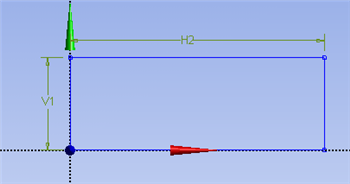
Under Sketching Toolboxes, select Dimensions tab, use the default dimensioning tools. Dimension the geometry as shown in the following image.
| newwindow | ||||
|---|---|---|---|---|
| ||||
https://confluence.cornell.edu/download/attachments/85624044/Dim_FullDimRect.png |
Under the Details View table (located in the lower left corner), set V1=0.1m and set H2=8m, as shown in the image below.
...