 Sign-up for free online course on ANSYS simulations!
...
Main Menu > Define > Models > Energy...
The energy equation can be turned off since this is an incompressible flow and we are not interested in the temperature. Make sure no tick mark appears next to Energy Equation.
Main Menu > Define > Models > Viscous...
Choose k-epsilon (2eqn). Notice that the window expands and additional options are displayed on choosing the k-epsilon turbulence model. Under Near-Wall Treatment, pick Enhanced Wall Treatment so that we may get a more accurate result.
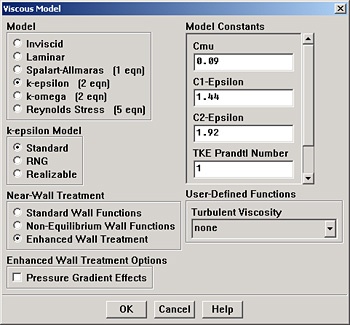
Click OK.
Main Menu > Define > Models > Energy...
The energy equation can be turned off since this is an incompressible flow and we are not interested in the temperature. Make sure no tick mark appears next to Energy Equation.
Main Menu > Define > Materials...
...