*** This version of Confluence is for testing only and contains a copy of content from June 29th 2026. No changes will be preserved. ***

...
Set your process controller to automatic operation and select "Add Chemical" as your first state.
Note: You may encounter problems after doing this such as the pump is not pumping or a valve is not working or there is leaking
You should try to fix any problems as they arise and troubleshoot the experiment. Don't worry if you spill water, but clean it up as necessary.
Before beginning, click on the "Plant Operation" tab. The "Plant Operation" tab allows us to monitor how the experiment is running and provides a quick check for troubleshooting. If the green light is illuminated in this tab, this indicates that Process Controller is communicating with and giving an ON value to either the valve or pump.
...
Next, start the experiment in Process Controller dragging down and selecting the "Operator Selected State" to be "Add Chemical." When you select this state, the plant operation tab should look very familiar to the figure below with the appropriate valve and pump turned ON.
Note: You may encounter problems after doing this such as the pump is not pumping or a valve is not working or there is leaking
You should try to fix any problems as they arise and troubleshoot the experiment. Don't worry if you spill water, but clean it up as necessary.
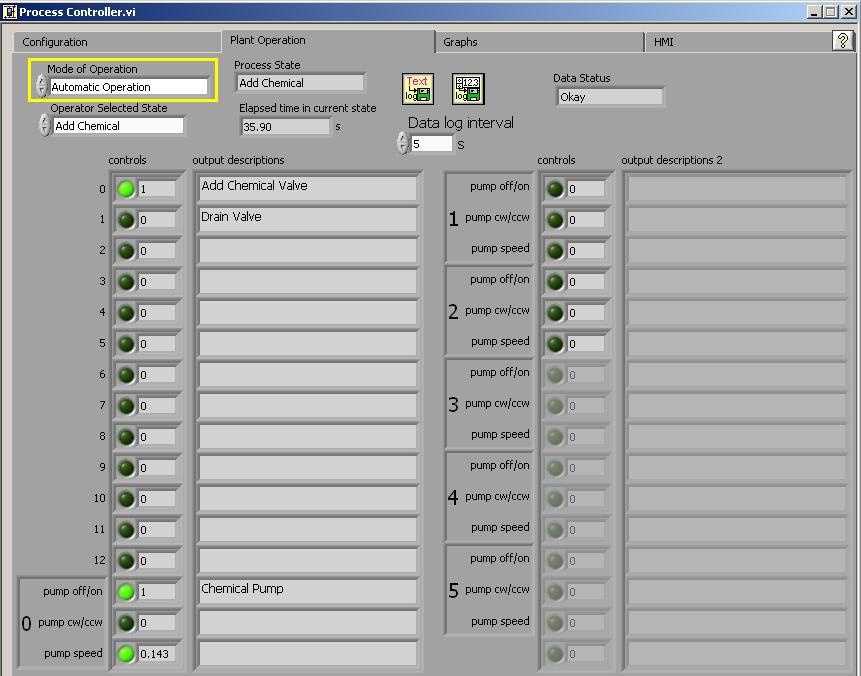
As the experiment is running check to ensure that things are working properly.
...