 Sign-up for free online course on ANSYS simulations!
...
Main Menu > Solve > Animate > Define... 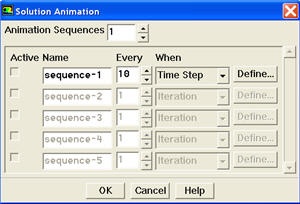
Increase the Animation Sequences to 1. Enter 10 for Every. Select Time Step from When drop-down list. Click Define... for sequence-1 to open the Animation Sequence panel. 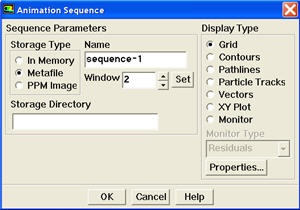
Increase Window to 2 and click the Set button to open a graphics window. Select Contours from the Display Type list to open the Contours panel. Select Velocity... and Vorticity Magnitude from the Contours of drop-down lists. 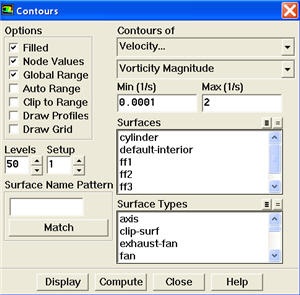
Disable Auto Range and Clip to Range from the Options group box. Enter 0.0001 and 2 for Min and Max, respectively. Select Levels to 50. Click Display.
Iterate the Solution
Main Menu > Solve > Iterate...
...