 Sign-up for free online course on ANSYS simulations!
...
Main Menu > Adapt > Region...
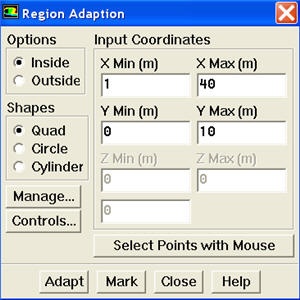
Enter 1 and 40 for X Min and X Max. Enter 0 and 10 for Y Min and Y Max. Click Mark. FLUENT will print the following message in the console window:
5416 cells marked for refinement, 0 cells marked for coarsening
Close the Region Adaption panel.
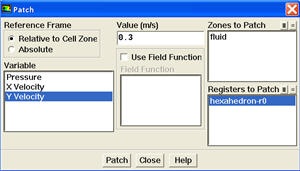
We will now patch Y velocity in the registered region.
Main Menu > Solve > Initializate > Patch...
| newwindow | ||||
|---|---|---|---|---|
| ||||
https://confluence.cornell.edu/download/attachments/107011456/patch.jpg |
...