 Sign-up for free online course on ANSYS simulations!
...
Define > Boundary Conditions
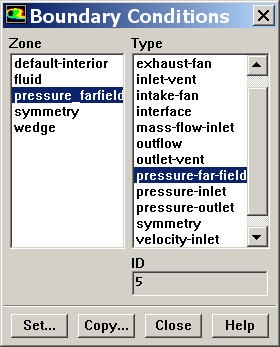
Set the boundary comdition condition for the pressure_farfield surface (aka zone) to the pressure-far-field boundary type by clicking on the latter. Select Yes to in the pop-up window asking if it's "OK to change pressure_farfield's type from wall to pressure-far-field?".
Set the Gauge Pressure to 101325. Set the Mach Number to 3. Under X-Component of Flow Direction, put enter a value of 1 (i.e. the farfield flow isin is in the X direction).
Next, click on the Thermal Tab. Change the temperature to 300K.
...
Similarly, change the boundary condition for the symmetry surface to the symmetry boundary type. No user input is required for the symmetry boundary type. At any boundary set to the symmetry type, FLUENT internally sets the
- normal velocity = 0
- normal gradients of all variables = 0
...
The boundary type for the wedge surface is set to wall by default. There is no need to change that.Set wedge to wall boundary type and symmetry to symmetry type.
Go to Step 5: Solve!
See and rate the complete Learning Module
...