 Sign-up for free online course on ANSYS simulations!
...
Define > Boundary Conditions
Set the boundary type for the pressure_farfield surface (aka zone) to the pressure-far-field boundary type by clicking on the latter. 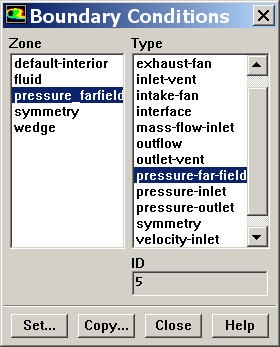
Then click Set.... Set the Gauge Pressure to 101325. Set the Mach Number to 3. Under X-Component of Flow Direction, put a value of 1 (i.e. the farfield flow isin the X direction).
...
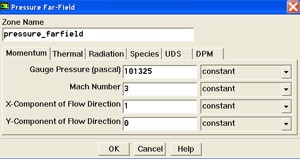
(click picture for larger image)
Click OK.
The boundary type for the wedge surface is set to wall by default. There is no need to change that. boundary type and symmetry to symmetry type.
Set wedge to wall boundary type and symmetry to symmetry type.
...